This forum is locked and will eventually go offline. If you have feedback to share you can find us in our Discord channel "MythoLogic Interactive" https://discord.gg/nECKnbT7gk
Forum rules
Forum rules
Cannot set "MZLED" effect direction
Forum rules
By using the forum you agree to the following rules. For this forum you also need to follow these additional rules.
By using the forum you agree to the following rules. For this forum you also need to follow these additional rules.
-
NearHuscarl
- Superfighter

- Posts: 97
- Joined: Thu Feb 07, 2019 4:36 am
Cannot set "MZLED" effect direction
Right now the "MZLED" effect's position and angle is the same as IObject's position and angle. that IObject's UniqueID is arg[0]. Looking at the script in Operation Sunrise campaign, Chapter 'The Courtyard', it looks like the second argument position is the direction Vector of the effect which doesn't work at all.
0 x

-
Gurt

- Lead Programmer

- Posts: 1887
- Joined: Sun Feb 28, 2016 3:22 pm
- Title: Lead programmer
- Started SFD: Made it!
- Location: Sweden
- Gender:
- Age: 36
If you want to rotate this specific effect you need to create an invisible block or something that's at the position and rotation you want the effect to be at. This is how the MZLED effect is designed and why it's not in the EffectName/ScriptAPI in a public way as it's quirky to work with. You will have to work around it's limitations.
0 x
Gurt
-
NearHuscarl
- Superfighter
- Posts: 97
- Joined: Thu Feb 07, 2019 4:36 am
I can do that using EdgeGrab or something. But it doesn't take direction into account. When I flip the object horizontally, I expect the MZLED effect to be flipped too. Can you please fix that?
Right

Left

FYI I cannot fix this by simply by rotating 180deg and flipping it vertically because I cannot flip vertically in script. See this thread
Right
Left
FYI I cannot fix this by simply by rotating 180deg and flipping it vertically because I cannot flip vertically in script. See this thread
0 x
-
JakSparro98

- Superfighter
- Posts: 530
- Joined: Fri Jul 15, 2016 7:56 pm
- Started SFD: PreAlpha 1.0.5
- Location: Rome, Italy
- Gender:
- Age: 27
vertical flip can be achieved even with only horizontal flip, you need to add 180 degrees after the flip and you will get the same result as flipping vertically.NearHuscarl wrote: ↑Wed Mar 04, 2020 1:12 am[..] I cannot flip vertically in script. See this thread
Off Topic
flip suggestion was supposed be marked as implemented after all this time.
0 x
-
NearHuscarl
- Superfighter
- Posts: 97
- Joined: Thu Feb 07, 2019 4:36 am
I mentioned the flip because I think it's pretty easy to implement and maybe the devs kind of forgot about it.
Off Topic
Thank you. I already solved that using an easier way. Use a small object like LedgeGrab tile and set the position and angle. It will also be the position and angle of the muzzle effect itself.
0 x
-
JakSparro98
- Superfighter
- Posts: 530
- Joined: Fri Jul 15, 2016 7:56 pm
- Started SFD: PreAlpha 1.0.5
- Location: Rome, Italy
- Gender:
- Age: 27
The ability to flip a tile is ALREADY implemented (IObject class) but only horizontally.NearHuscarl wrote: ↑Fri Mar 06, 2020 3:38 amI mentioned the flip because I think it's pretty easy to implement and maybe the devs kind of forgot about it.
[..]
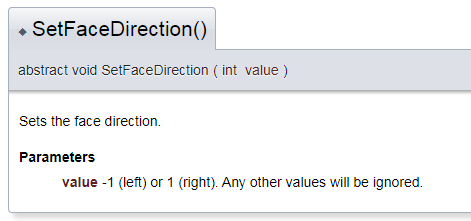
It's unclear if you got the point, but for obtaining the same result of flipping vertically you simply have to add or subtract 180 degrees after the SetFaceDirection in order to emulate a flip from up or from bottom.
0 x
-
NearHuscarl
- Superfighter
- Posts: 97
- Joined: Thu Feb 07, 2019 4:36 am
I was unclear at the first time. That's why I also want a flip method helper to make it more accessible for other scripters who may confuse like me.
0 x
-
Gurt
- Lead Programmer
- Posts: 1887
- Joined: Sun Feb 28, 2016 3:22 pm
- Title: Lead programmer
- Started SFD: Made it!
- Location: Sweden
- Gender:
- Age: 36
This is the correct way of flipping vertically. That's exactly what the map editor does internally too. If we were to add a flip vertically we would just get bug reports that the angle changes and you can still achieve the vertical flip with a rotation+horizontal flip.JakSparro98 wrote: ↑Fri Mar 06, 2020 10:42 pmThe ability to flip a tile is ALREADY implemented (IObject class) but only horizontally.NearHuscarl wrote: ↑Fri Mar 06, 2020 3:38 amI mentioned the flip because I think it's pretty easy to implement and maybe the devs kind of forgot about it.
[..]
It's unclear if you got the point, but for obtaining the same result of flipping vertically you simply have to add or subtract 180 degrees after the SetFaceDirection in order to emulate a flip from up or from bottom.
0 x
Gurt